

A free WordPress popup plugin that connects in one click and creates WooCommerce coupons
Install the free plugin, click Connect, and build pop-ups, floating bars, inline forms and prize wheels in the drag-and-drop editor. Show them by post category and tag, and on WooCommerce create one-off coupons and add products to the cart.
How Stacked Homes grew newsletter sign-ups on WordPress
Stacked Homes, a Singapore property editorial site, uses Convertful for first-touch messages that lead readers to its sign-up form, placed by article category.
"Convertful allows me to choose from many different designs, e.g. pop-up, welcome screen, callouts."
"I can also choose exact placements, and even customize by article category. Not a lot of companies provide this."
- Live CSS editor. Preview and edit styles without opening a new tab.
- Page data passed on. The page a lead signed up on is passed to the lead form as a UTM parameter.
- Quick tests. Duplicate a widget, rename it, edit and publish.
Blogs, business sites and WooCommerce stores, one editor
Widgets load from Convertful’s content delivery network without iframes, so your WordPress install stays light.
- Bloggers and publishers. Content upgrades, content locking and newsletter forms shown by post category.
- Business sites. A lead form, a booking offer or a webinar promotion on the right pages.
- WooCommerce stores. Welcome discounts, cart savers and coupons generated automatically.
The plugin handles the connection and the WordPress rules
One-click connection
Install the plugin and click Connect. You do not need to edit theme files.
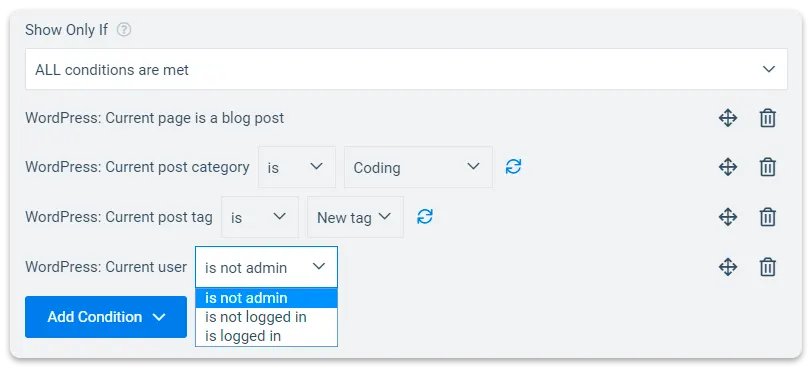
WordPress display rules
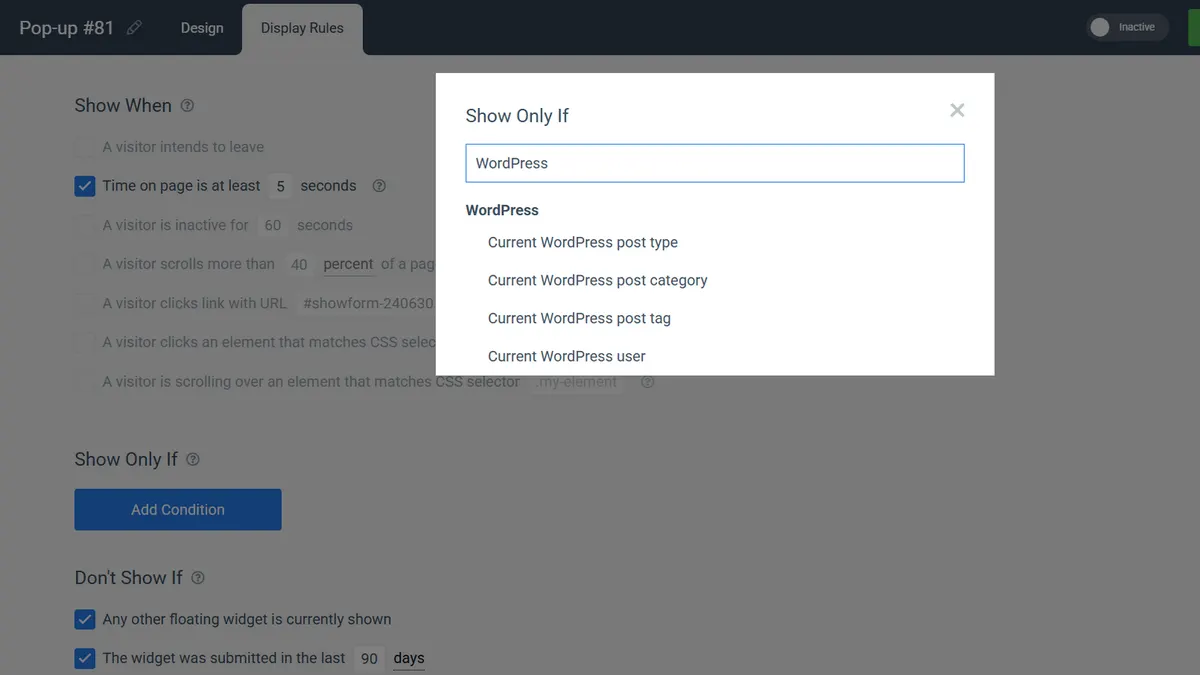
Show a widget only on chosen post categories, tags or post types, to logged-in WordPress users, or on product and category pages.
Every widget type
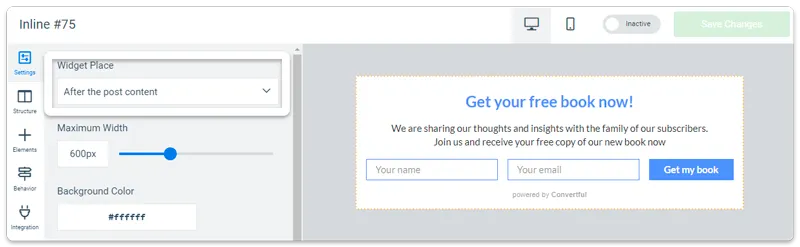
Pop-ups, scroll boxes, floating bars, welcome mats, inline forms via shortcode, floating buttons and chat bubbles.
Leads go to your email tool
27 native integrations plus Zapier, n8n, Integrately and webhooks.
Coupons, carts and product pages, handled by the same plugin
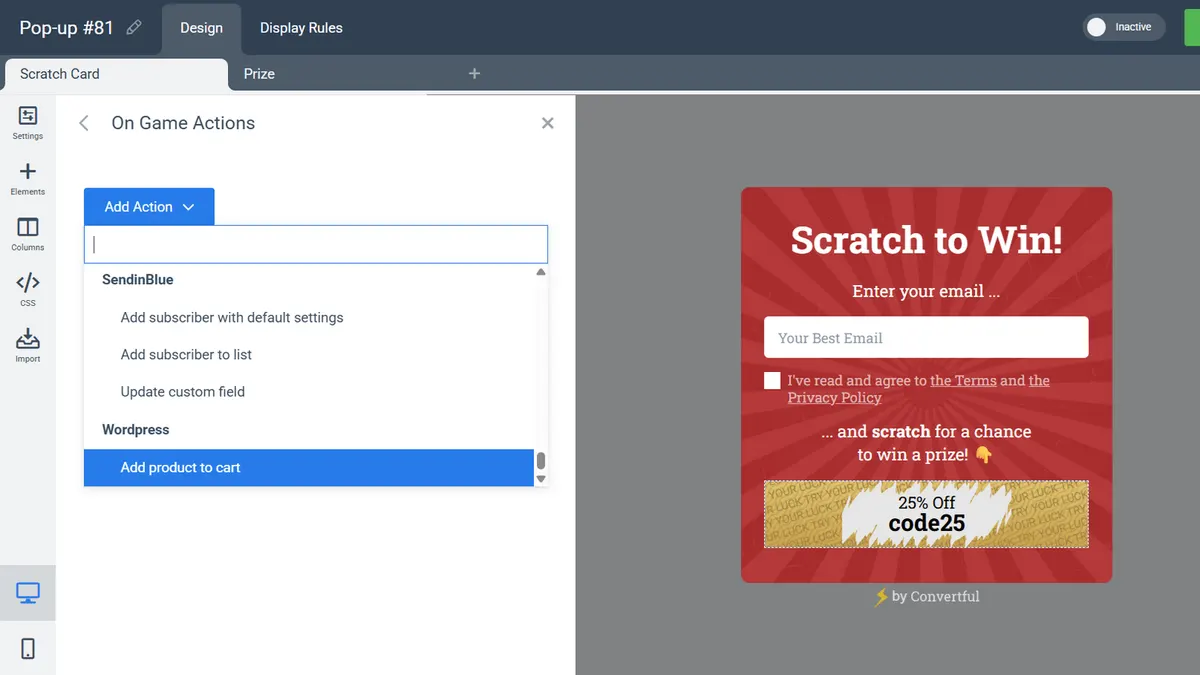
The WooCommerce features are available exclusively through the WordPress plugin. Generate a one-time coupon when a shopper spins the wheel or opts in, add a product to the cart from a button, and show offers only on the product or category pages you choose.
- One-time coupons. A fresh WooCommerce discount code per spin, scratch or opt-in, so codes cannot be shared around.
- Add product to cart. An on-submit action that drops a chosen product into the cart.
- Product and category rules. Show a widget only on certain product or category pages, or when a specific item is added to the cart.
- Live cart text. Cart total, item count and the amount left to free shipping as shortcodes in any widget.
Convertful for WordPress and WooCommerce
Where a feature starts above Solo, the plan is named.
| Capability | Convertful |
|---|---|
| Plugin | Free plugin at wordpress.org/plugins/convertful/, one-click connection. Every plan. |
| WordPress display rules | Post category, post type, visitor's tag, WordPress user, product and category pages. Every plan. |
| WooCommerce discount codes | One-time coupons generated through gamified or opt-in widgets. Every plan, via the plugin. |
| Add product to cart | On-submit action that adds a chosen product to the shopper's cart. Every plan, via the plugin. |
| Cart triggers and shortcodes | Show when a specific item is added to the cart; free-shipping threshold, cart total and item count shortcodes. Via the plugin or the Cart Integration API. |
| Inline forms | Embed in posts and pages by shortcode. Every plan. |
| Other connection methods | Connection script or Google Tag Manager for non-WordPress sites. Every plan. |
| Widget types and templates | Seven widget types, 300+ templates. Every plan. |
| A/B testing, multi-step, AI, hosted widgets, no badge | Starter and above. |
| Two-way CRM sync | Starter and above. |
| CRM tags as display rules, sub-accounts | Growth and above. |
| Sites per plan | 1 on Solo, 3 on Starter, 5 on Growth, 10 on Enterprise. |
| Agency tools | Unlimited sub-accounts and white label on Agency plans. |
What WordPress sites build with it
Each has a template and a step-by-step guide on the use cases page.
Content upgrade by category
A pop-up shown only on posts in one category, offering a related download.
Content locking
Blur the rest of an article until the reader opts in.
Welcome discount wheel
A spin-to-win on a WooCommerce store with a one-off coupon per spin.
Cart saver on exit intent
Limited to the cart and checkout pages, with a cart value condition.
Newsletter inline form
Embedded after every post with a shortcode.
What WordPress users say
“Easiest Way to Gather Emails and Other Opt-ins (By Far!)”

“I’m using it for my own sites and client sites and it’s been my go-to software for all the different types of CTAs”

“Very beautiful UI, extremely easy to use and setup. Doesn’t disrupt site speed in any way.”

Guides for WordPress and WooCommerce sites
Turning readers into subscribers, choosing a store platform, and a WordPress case study.
How to Turn Blog Readers into Email Subscribers: Lead Magnets Ideas
Learn how lead magnets defeat the resistance bloggers face when asking readers to join email list, and how to turn your blog into a lead gen…

WooCommerce vs. Shopify: A Definitive Comparison
WooCommerce and Shopify may be the two biggest e-commerce platforms out there. So we’re helping you figure out which one will help you thriv…

How Convertful Helped Stacked Homes Increase Newsletter Subscribers
Discover how Stacked Homes uses Convertful to create first touchpoint messages for visitors and gain a significant increase in newsletter su…
WordPress and WooCommerce questions
Is the Convertful WordPress plugin free?
Yes. The plugin is free on wordpress.org and connects your site in one click. Convertful itself starts at $7 a month billed yearly, with a free 14-day trial on every plan.
Does it work with my theme or page builder?
The plugin is built to work with major WordPress themes and page builders. Inline forms are placed with a shortcode, so they fit wherever your builder lets you add content.
Can I show a pop-up only on certain posts?
Yes. Use the WordPress display rules for post category, post type or tag, or a page URL rule for a specific post. Rules can be combined with and/or.
What if my site is not on WordPress?
Add the connection script directly or through Google Tag Manager. Shopify stores have their own Shopify app.
Can I run several WordPress sites on one account?
Yes. Solo covers 1 site, Starter 3, Growth 5 and Enterprise 10. Growth and above add sub-accounts for clients or team members, and Agency plans add unlimited sub-accounts and white label.
Which features start above Solo?
A/B testing, multi-step widgets, AI, hosted widgets and badge removal start on Starter. Two-way CRM sync starts on Starter, and CRM-tag display rules and sub-accounts start on Growth. Everything WooCommerce-specific is on every plan through the plugin.
Install the plugin and build your first WordPress pop-up
WooCommerce coupons, add-to-cart and category rules are on every plan, from Solo at $7 a month billed yearly.