

Mailchimp pop-ups and forms for WordPress
Grow your Mailchimp audience from your WordPress site with pop-ups, scroll boxes and forms inside your posts. Readers can join a different group for each topic you write about.
Set up Mailchimp on WordPress in six steps
You need to be able to install plugins on your WordPress site, and your Mailchimp login.
- 1Install the Convertful plugin
In WordPress, go to Plugins, Add New and search for Convertful. Install and activate the free plugin.
- 2Connect your site
Click Connect to Convertful on the plugin page, then Approve. New to Convertful? You can create your account on the same screen.
- 3Connect Mailchimp
In Convertful, open Integrations, add Mailchimp and click Connect to log in. An API key from Profile, Extras, API keys in Mailchimp works too.
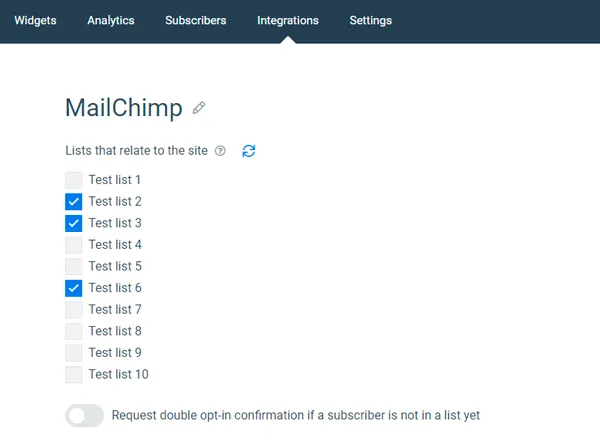
- 4Pick lists and double opt-in
Tick the lists that belong to this site, choose the default list and decide whether to ask for double opt-in. Your merge fields are matched for you.
- 5Build the widget and add actions
Choose a template, then add Mailchimp actions to the submit button: a list, a group, a tag or a note.
- 6Place it and go live
Set the trigger and the WordPress rules, or place an inline form with a shortcode. Save and activate.
A Mailchimp group for each topic
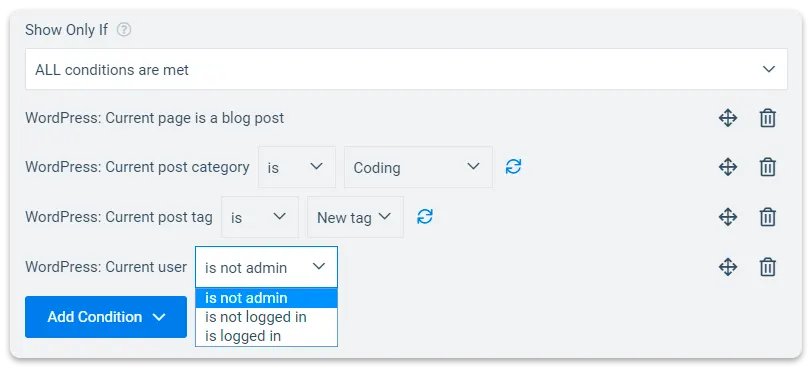
WordPress rules show a widget only on posts in a chosen category, tag or post type. Give each one its own Mailchimp group or tag, and readers are grouped by what they came to read.
Your recipe readers join the recipes group, your travel readers the travel group, and each gets the emails they signed up for.
Sign-up forms inside your posts
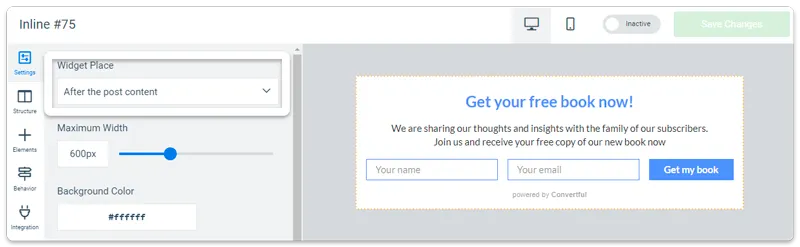
Place a Mailchimp form anywhere in a post or page with a shortcode, or add it after every post automatically. Readers see it right where they finish an article.
Mailchimp widgets for WordPress sites
Mailchimp and WordPress questions
Do I need another plugin for Mailchimp?
No. Convertful connects to Mailchimp itself, so the Convertful plugin is the only one you add to WordPress.
How do I turn on double opt-in?
In Convertful's Mailchimp settings, switch on Request double opt-in confirmation if a subscriber is not in a list yet, and turn on double opt-in for the audience in Mailchimp too. Mailchimp sends the confirmation email.
Will it work with my theme or page builder?
The plugin is built to work with major WordPress themes and page builders. Inline forms go in with a shortcode, so they fit wherever your builder lets you add text.
Will pop-ups slow my site down?
Widgets load from Convertful's content delivery network without iframes, so your WordPress install stays light.
Other WordPress setup guides
Add your first Mailchimp form to WordPress
Install the free plugin, log in to Mailchimp and pick a template.