

ActiveCampaign pop-ups for your Shopify store
Collect emails on your Shopify store and start the right ActiveCampaign automation the moment someone signs up. Each widget can add tags, join a list or create a deal.
Connect ActiveCampaign to Shopify in six steps
You need admin access to your Shopify store and an ActiveCampaign account.
- 1Install the Shopify app
Install Convertful: Lead Generation from the Shopify App Store and click Approve to connect the store to Convertful.
- 2Turn on the app embed
Copy your Owner ID from Convertful into the Convertful app embed in your theme settings, switch it on and save. Click Check Connection in Convertful to finish.
- 3Add your API URL and key
In ActiveCampaign, open Settings, Developer and copy the API URL and key. In Convertful, add ActiveCampaign under Integrations and paste both.
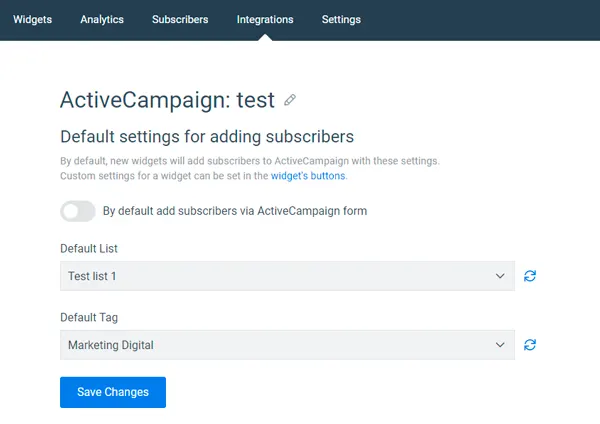
- 4Set a default list and tag
Choose the list and tag every new contact gets. Field matches are made for you, and you can adjust them against Lists, Manage Fields in ActiveCampaign.
- 5Add actions to the button
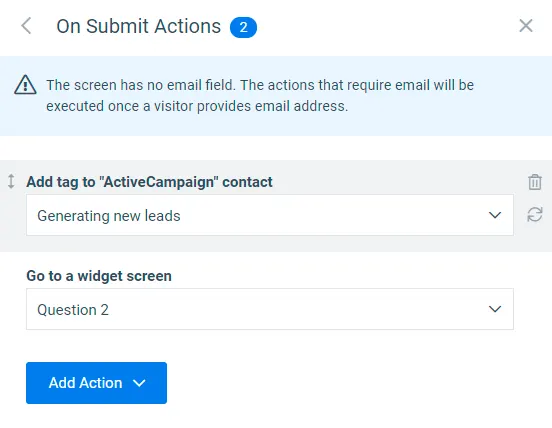
On the widget's submit button, add the ActiveCampaign actions you need, such as a tag, an automation or a deal.
- 6Set the rules and activate
Choose when and where the widget shows, then save and switch it on.
Start an automation from any widget
Add a contact to an ActiveCampaign automation straight from the submit button, so your welcome series starts as soon as someone signs up. In the same click you can add or remove tags, move the contact between lists and add a note.
For bigger orders, a form can create a deal and set its stage, so store leads land in your sales pipeline.
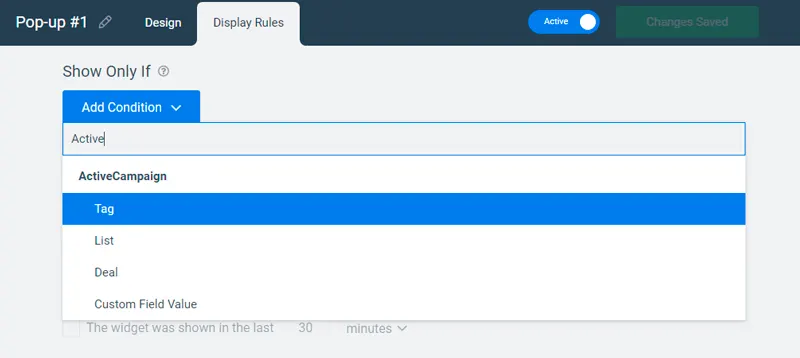
Offers by tag, list or deal
On Growth and above, widgets can read ActiveCampaign data. Show an offer only to contacts with a certain tag, on a certain list, with an open deal in a pipeline or with a certain field value.
- Shopify rules too. Combine them with cart value, products in the cart and page type.
- Recognise email clicks. Add
?conv_email=%EMAIL%to the links in ActiveCampaign emails.
ActiveCampaign widgets for Shopify stores
ActiveCampaign and Shopify questions
Can a pop-up start an ActiveCampaign automation?
Yes. Add Add contact to automation to the submit button and pick the automation. Remove contact from automation is there too, for people who should leave a sequence once they sign up.
Can Shopify pop-ups create deals?
Yes. Make a deal with contact creates a deal from the form, and Set current deal stage moves it along your pipeline.
Will existing contacts see the welcome offer again?
Not unless you want them to. A Don't Show If rule hides a widget from anyone who has already subscribed through any widget, and an ActiveCampaign tag or list rule can hide it from contacts you already have.
What does it cost?
ActiveCampaign is included on every Convertful plan. The Shopify app is free to install, and unique discount codes, add to cart and cart rules are a one-time $10 payment.
Other Shopify setup guides
Start your first ActiveCampaign automation from Shopify
Install the free app, add your API key and publish a welcome offer.