

Holiday widgets that come back every year
Schedule a widget once and it appears for the same holiday or seasonal campaign every year, with no manual date changes.
Good for: eCommerce, Digital Businesses, Agencies
- A template: Black Friday, Christmas or any Special Occasions template, included on Starter and above
- A display rule: Recurring Limited Events, with time on page at least 1 second
- Your email tool or CRM, connected once, so every lead lands there (optional)
Automate your widget displays for holidays and seasonal campaigns by scheduling widgets to appear annually. This saves time and removes the need to manually do it each year. For example, you could create one widget and set it to display during Christmas and New Year.
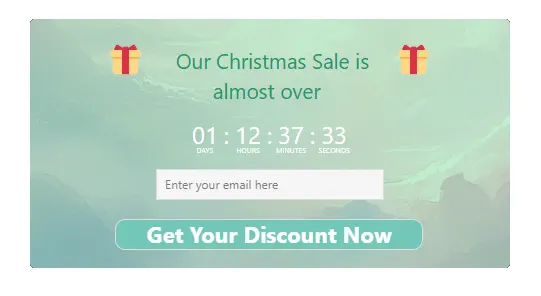
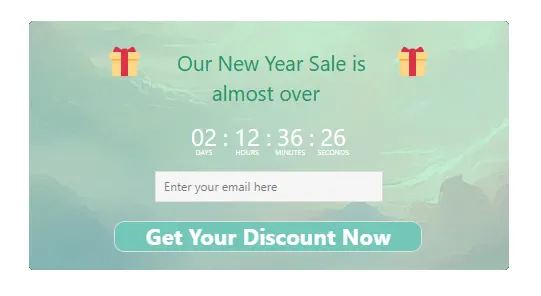 How to do this:
- Create a widget and go to the Display Rules and select “Recurring Limited Events”.
- Set the “Show When” condition, for example “Time on page is at least 1 second”.
- Click on the “Add Holiday” button and select the holiday or seasonal campaign that you want your widget to display. Alternatively add your own custom event, start and finish dates. Note you can add more than one holiday/event, for example Christmas and New Year.
- Pick the time zone that you want the widget to display, either Visitor Time Zone or Site Time Zone (this is the site time zone you set in your Convertful account).
- If you want, you can even add a countdown clock that will end when the holiday/event ends.
- Save and Activate your widget and that’s it, the widget will now annually appear, disappear and reappear automatically as per the set event dates.
“The form/CTA builder is easy to use and puts many other tools to shame”

Set this up during your free trial
Start from the template, change the words and colours, choose who sees it and publish.
Questions about Holiday widgets that come back every year
Which holidays and events are in the list?
Black Friday, Christmas, Valentine's Day and other recurring events, and you can add a custom event with your own start and finish dates. One widget can carry more than one event, for example Christmas and New Year.
Can the widget text change from one event to the next?
Yes. Put the shortcodes {holiday_name} and {holiday_coupon} in the text and Convertful swaps in the current event's name and coupon code. You can also add a countdown timer set to From Holidays so it ends when the event ends. Recurring Limited Events is included from the Starter plan.
Can I show a recurring holiday widget only to some visitors?
Yes. Display rules cover exit intent, time on page, scroll depth, visit number, page URL, country, device and referral source, and you can hide it from people who already subscribed. On Growth and above you can also use tags and fields from your email tool or CRM.
Can the sign-ups go to my email tool or CRM?
Yes. Every form field, including prize names, coupon codes and survey answers, can map to a field or tag in any of the 27 native integrations, or go to any other system through Zapier, n8n or webhooks.
Try this on your own site
Free for 14 days on every plan. Cancel from your billing page at any time.