
Spin To Win
For: eCommerce, Digital Businesses, SaaS, Services
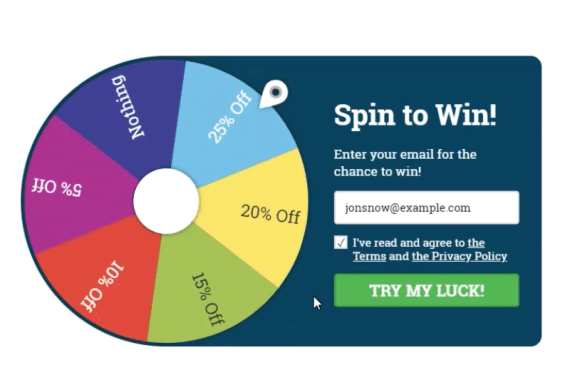
Spin To Win popups are a highly engaging, gamified way to capture attention and encourage interaction. By tapping into visitors’ natural curiosity and love for rewards, this format transforms a simple popup into a fun experience, one that feels more like a game than a marketing message.
With Convertful, you can easily add a Spin To Win popup to your website and offer visitors the chance to win discounts, coupon codes, free resources, or other incentives. This approach not only boosts engagement but also increases email signups and conversions by making participation enjoyable and rewarding.
Why use Spin To Win?
- Grab attention instantly: Interactive popups stand out more than static offers.
- Increase engagement: Visitors are more likely to participate when there’s an element of fun and chance.
- Grow your email list: Collect contact details before visitors spin the wheel.
- Boost conversions: Prizes and discounts create urgency and motivation to act.
- Enhance brand experience: Gamification makes your brand feel more memorable and approachable.
Common use cases
- eCommerce stores: Offer discount codes, free shipping, or small giveaways to incentivize purchases.
- SaaS companies: Reward users with trial extensions, feature unlocks, or onboarding bonuses.
- Service businesses: Offer consultations, upgrades, or special promotions.
- Seasonal campaigns: Use Spin To Win during sales events, product launches, or holidays to increase participation.
How to set up Spin To Win
-
Create a Spin To Win widget
- Create a new widget and select a Spin To Win template from the Template Library to get started quickly.
-
Configure prize options
-
Under “Spin To Win Settings”, add, edit, or remove prize options for the wheel:
- Prize: The name of the prize displayed on the wheel
- Coupon code: The value of the prize (coupon code by default)
-
Gravity: Controls the probability of winning each prize
- The percentage shown represents the exact chance of winning that prize, based on the total number of slices and the gravity value (0–100) you assign.
-
Under “Spin To Win Settings”, add, edit, or remove prize options for the wheel:
-
Set data fields for prize tracking
- In Data Fields, specify which fields should store the Prize Name and Coupon Code.
- These values are saved in the Convertful Subscribers list and passed to any connected integrations or contact lists.
- Note: If you’re using multiple widgets with gamification elements, be sure to assign unique data fields for each widget. This prevents prizes from different campaigns from overwriting one another.

-
Customize the Prize screen content
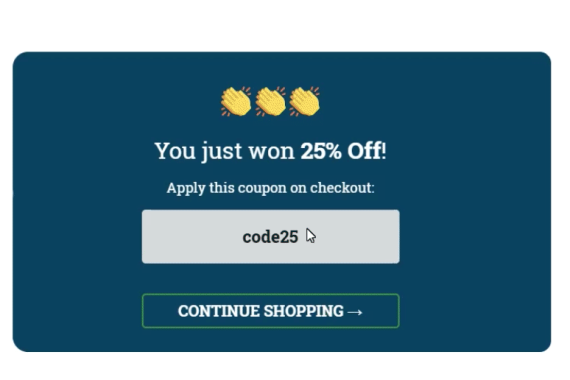
- On the “Prize” screen, use the provided shortcodes inside the text field to dynamically display the prize name and coupon code.
- These shortcodes are automatically replaced with the actual values after the visitor spins the wheel.
-
Adjust design and layout
- Customize the design and layout of both the Spin To Win screen and the Prize screen to match your branding.
- The mobile version has its own layout controls.
- You can show a smaller or cropped version of the wheel on mobile to keep the experience compact and user-friendly.
-
Set the submit action
- Configure the on submit button to navigate users to the “Prize” screen once the spin is completed.
-
Define display rules and activate
- Set the Display Rules based on when and where you want the widget to appear (for example, on page load, exit intent, or after a delay).
- Save and activate the widget to make it live on your site.


