
Smart Discount Popups
For: eCommerce, Digital Businesses
Smart discount popups are an effective way to capture leads and recover potential lost revenue without interrupting the shopping experience. Instead of showing aggressive or poorly timed popups, smart discount popups appear only when a visitor shows exit intent, such as moving their cursor toward the browser close button.
With Convertful, you can create discreet, well-timed discount popups that feel helpful rather than intrusive. Visitors are presented with a valuable incentive at the exact moment they’re about to leave, giving them a compelling reason to stay connected or complete their purchase.
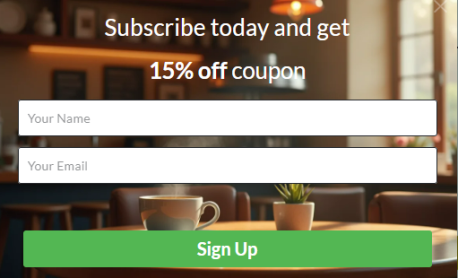
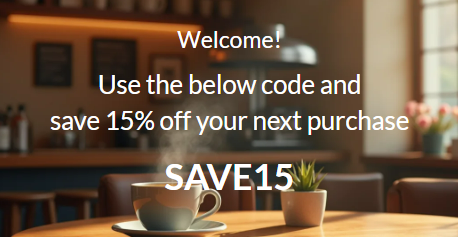
Why use smart discount popups?
- Recover abandoning visitors: Capture emails or offer discounts just before users leave your site.
- Grow your email list: Turn hesitant visitors into subscribers you can nurture over time.
- Increase conversions: A timely incentive can be the final push needed to complete a purchase.
- Maintain a positive UX: Exit-intent triggers ensure popups appear only when relevant.
Common use cases
- Online stores: Offer a one-time discount to first-time visitors who are about to leave without purchasing.
- Digital products: Share a promo code for ebooks, courses, or subscriptions in exchange for an email.
- Seasonal campaigns: Present limited-time offers during sales events or product launches.
- Cart abandonment prevention: Encourage visitors to save their cart or receive a discount before exiting.
How to set up smart discount popups
-
Create a popup widget
Start by creating a popup widget and add a clear, compelling message that explains the discount or offer (for example, “Wait! Get 10% off before you go”). -
Add an email capture field
Include an email input field and an on submit button so visitors can enter their email to receive the discount. -
Create a confirmation screen
In the widget editor, click the “+” button to add a second screen. Use this screen to display the discount code along with a short confirmation message (for example, “Thanks! Here’s your exclusive code”). -
Set the submit action
Go to the settings for the on submit button, choose “Go to a widget screen”, and select the confirmation screen you created in the previous step. -
Configure exit-intent display rules
Open the Display Rules settings and set the widget to show when “A visitor intends to leave”. This ensures the popup appears only at the right moment. -
Save, activate, and test
Save and activate the widget. Test it on your site to confirm the popup appears on exit intent and that the discount code displays correctly after submission.
Once activated, your smart discount popup will automatically engage visitors as they’re about to leave—helping you capture leads, boost conversions, and make the most of every visit.